Latest Entries »

As I have mentioned in my previous post, I am working on creating an “universal” OAuth plugin for WordPress.
So far, I have been trying with Facebook, Twitter and Google. I have made the following observations:

FaceBook doesn’t login when the scope is not set, but allows this to be an empty string. However, Google complains about a missing parameter when this is not set. When this is set to an incorrect parameter, such as “email” (which is correct for Facebook btw), the login dialog appears, asking me to grant permissions to my application. However, the application does not receive an access token. I do receive an access token when I use ‘https://www.googleapis.com/auth/userinfo.email’ as my scope.

Facebook has something like a default scope when I don’t request anything. Therefore, a scope is not required there. It seems, I must request some scope for Google. So, it seems, I should store a default scope to my plugin as well.

The PHP OAuth implementation I am using to generate my WordPress plugin has some services pre-defined. So, I can just tell it to connect to Facebook, Twitter, Google, Tumblr, etc. etc. So, if some scope is required, I might add it as default in the OAuth implementation, or add it as a predefined interface element.

Recently, I’ve been looking at OAuth again. When, in the past, I was checking our Drupal, I had this general OAuth plugin. Just enter the protocol version, urls, client id and secret, and you could use any OAuth provider.

I have been looking for something simular for WordPress, but it doesn’t appear to exist. There exist some plugins specific to a website,
There are plugins line Gigyas and Janrain, which require you to sign up at their site. I don’t trust those kind of services, introducing another party in the login process, which, if compromised, could harm both the user and the website. Depending on a third party to authenticate your users is one thing, but letting a fourth party nagotiate between you and the third party is just asking for trouble if you ask me.

Last time I looked at OAuth, it seemed to me Facebook was the only service using OAuth 2.0. Nowadays, a higher number of services is using the 2.0 version of the protocol. Even Microsoft has adapted to this protocol, depricating it’s proprietary protocols it used when it was still called a Passport account. I know it was a long time ago when it was called this, but still, since when does Microsoft actually use standards (without raping them)?

Anyways… since there doesn’t appear to exist an universal OAuth solution for WordPress, I intent to make such a plugin. I think I’ll base it upon the oauth php library by Manuel Lemos. This library implements OAuth 1.0, 1.0a and 2.0. (For 2.0 some sites might use earlier drafts, not sure if this becomes problematic.) The source code is released under the 3 clause BSD license, so it could be used without a problem. I intend to create WordPress bindings for this library. So, I’ve been looking at the WordPress plugin API as well.

Well… I’m just getting some ideas ;)

P.S. When you think about using OAuth with Twitter, back then, and right now, I’m noticing the problem with the callback URL. You have to specify the callback URL at the application settings at their site.

The last straws of the migration process to the new server. The old server will expire in a few days, so, the last bits are to be migrated.

Migrating the git repository is quite straight forwarded. Just copying the gisosis directory over, and setting the directory. Please note, on debian, gitweb is, unlike on archlinux, a separate package

apt-get install gitosis gitweb

As the installation provided by OVH created two partitions, / and /var, I have to change the home directory of the git user accordingly, as the default location is /srv/gitosis, which would be located on the / directory.

Another thing that’s to be moved are the mailing lists. According to this site migrating mailman is just as simple as copying over the data. However, ISPConfig3 has some mailing list support, to the stuff has to be integrated as well.

To integrate mailman with the ISPConfig3 configuration, add the following to /etc/aliases, then run the newalises command

mailman:             "|/var/lib/mailman/mail/mailman post mailman"
mailman-admin:       "|/var/lib/mailman/mail/mailman admin mailman"
mailman-bounces:     "|/var/lib/mailman/mail/mailman bounces mailman"
mailman-confirm:     "|/var/lib/mailman/mail/mailman confirm mailman"
mailman-join:        "|/var/lib/mailman/mail/mailman join mailman"
mailman-leave:       "|/var/lib/mailman/mail/mailman leave mailman"
mailman-owner:       "|/var/lib/mailman/mail/mailman owner mailman"
mailman-request:     "|/var/lib/mailman/mail/mailman request mailman"
mailman-subscribe:   "|/var/lib/mailman/mail/mailman subscribe mailman"
mailman-unsubscribe: "|/var/lib/mailman/mail/mailman unsubscribe mailman"

And some additonal configuration

# ln -s /etc/mailman/apache.conf /etc/apache2/conf.d/mailman.conf
# /etc/init.d/postfix restart
# /etc/init.d/apache2 restart

Well, ISPConfig3 has to know about the lists, so I guess, I should add the lists first in the web interface, and then copy over the directories (lists and archives). When copying over the directories, keep in mind Arch has a different uid/gid for the mailman user (which it called list) so you have to chown the files accordingly.

Please note, due the new configuration, the URL for the web interface has changed from
http://lists.blaatschaap.be/mailman/listinfo to

http://lists.blaatschaap.be/cgi-bin/mailman/listinfo

To fix the URL, issue the following command

# /var/lib/mailman/bin/withlist -l -r fix_url bscp -u lists.blaatschaap.be

I guess I should make up some site at the lists.* subdomains on my server, well, just to redirect to the listinfo page. Anyways… migration of the mailing lists completes. Now, just some more sites, and I’ll also have to take a look at the gitweb, to finally move the BlaatSchaap Coding Projects page.

Yesterday, I tried logging in to my Raspberry Pi server from my phone using ConnectBot, an Android SSH client. It was disconnected immediately. Something is wrong. When being back at home, I tried logging in from my desktop, with the same problem. Pre-authentication disconnect.

It appears, when being booted headless, the Raspberry Pi enables a console at its composite port. Being located behind my tv, it’s easy to plug in a cable. systemctl status sshd indicated an error state, and it refused to start again. It would immediately get killed by a sigbus. A sigbus??? wtf?

The logfiles show the following error:

Mar  9 17:55:19 rpi-server sshd[21742]: Inconsistency detected by ld.so: dl-version.c: 224: _dl_check_map_versions: Assertion `needed != ((void *)0)' failed!

I assumed some upgrade I ran earlier upgraded some libraries, conflicting with some in-momory code, therefore I decided to reboot the Pi.

It comes up with the Raspberry logo, saying welcome to ArchLinux ARM, but then it just hangs. Nothing else happens. Nothing.

rpi_noboot

To verify if it’s the Pi, I decided to boot it up using the SD card from my other Pi. Since it boots fine, there is something wrong with the content of the rpi-server’s SD card, which seems to be confirmed by

Mar  9 17:55:14 rpi-server kernel: [3514985.125660] EXT4-fs error (device mmcblk0p2): __ext4_ext_check_block:475: inode #699: comm systemctl: bad header/extent: inval
id extent entries - magic f30a, entries 223, max 340(340), depth 0(0)

I have made an image if the SD card’s current state. I can restore the SD card with an earlier image I’ve made when installing rpi-server. I think I have changed some things since I’ve made that image, but the basic functionality, such as NFS, CUPS and SANE should be on there. (As I’ve mentioned I was going to make this backup in a post mentioning sane.

So, this seems to be a case of file system corruption. The question remains what caused this corrupt file system? Is there something wrong with the Pi? the SD card? Is there a bug in the kernel used by ArchLinuxARM? Was the system possibly hacked?

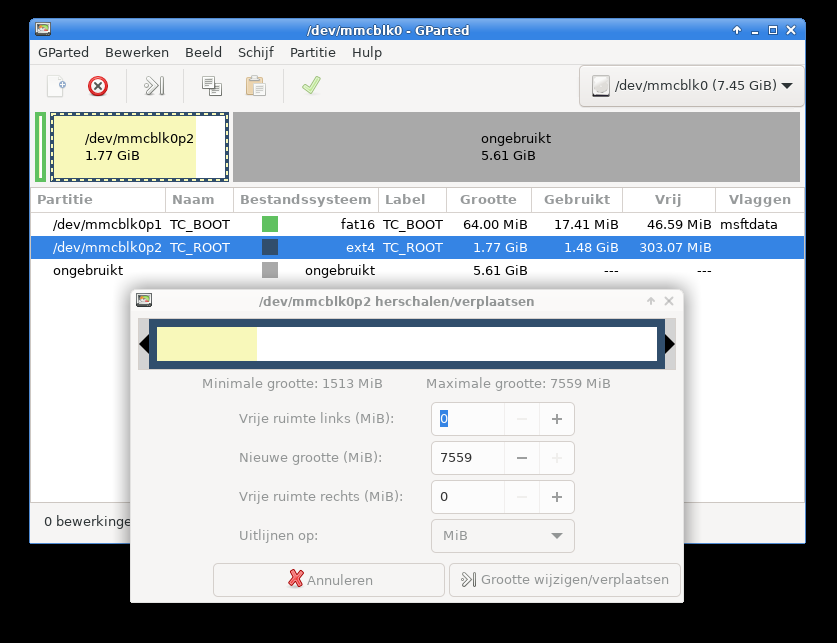
I ran fsck -y /dev/mmcblk0p2 on the SD card. I have a backup anyways, so the -y won’t hurt. I have mentioned, even though I marked it as “should be checked on boot” in my fstab, it doesn’t appear to be doing so for the rootfs. (It checks the bootfs during boot) But since this system is supposed to be always up, a check during boot shouldn’t make much difference. And in principe, the file system should not get corrupted. So…. why did it become corrupted?

Anyhow, getting multiple claimed blocks. Therefore I say it’s no use to continue, I should just write the old image back and that be it…. thinking about what I’ve installed afterwards… one of the things would be apache I guess…


My laptop’s SD slot stopped working due overheating. The samn /etc/cpufreq-bench.conf was set to governor ondemand. I have set it to powersave a dozen times, but it keeps popping back to ondemand, probably during the installation of updates. I don’t know why, but I need to clock down my laptop to the lowest possible speed or else it will overheat. The SD slot is the first thing to give issues when this happens.


Running on the image I put back, and performed an upgrade, I see these messages in my logs again:

[ 1417.529973] EXT4-fs error (device mmcblk0p2): ext4_ext_check_inode:462: inode #55228: comm pacman: bad header/extent: invalid magic - magic f34a, entries 1, max 4(0), depth 0(0)

I did the upgrade immediately and rebooted, so it is still either the SD card or the current kernel.

Server migration

As I’ve been mentioning before, the content is this server (ks26301.kimsufi.com) will be migrated to a new server (ks3291437.kimsufi.com). These are dedicated servers from http://www.isgenoeg.nl. The ks26301 server, which I have been using since April 2009, is their 2008 model. Back in 2009, their services got introduced in the Netherlands, and the first 1000 subscribers got a year free. I was one of the lucky.

Anyhow, this is a server from 2008, and the price hasn’t changed (apart from the taxes, that is). The point is, for the same price they offer much better specs. So, it makes sense to migrate. Also, over the past years I am hosting services for certain people, which makes the configuration I’ve been using since 2011 less optimal. I never enticipated the fact I would be offering hosting services to third parties, so even more reason to migrate my services to a new server.

At this point, I would like to highlight one of the issues that arrises during such a migration, and provide a solution for it. The problem is the way DNS works. When I change my DNS entries, it takes a while to propagate through the internet. The old IP address might be cached at some DNS server and so on. Therefore, during the migration, requests may arrive at both the old and the new server. So, how to make this situation transparant to the user?

First, let’s have a look at Apache. We’re going to use the mod_proxy for this purpose. I had this module already installed on my system, therefore, in my /etc/httpd/conf/httpd.conf I have

LoadModule proxy_module modules/mod_proxy.so
LoadModule proxy_connect_module modules/mod_proxy_connect.so
LoadModule proxy_ftp_module modules/mod_proxy_ftp.so
LoadModule proxy_http_module modules/mod_proxy_http.so
LoadModule proxy_scgi_module modules/mod_proxy_scgi.so
LoadModule proxy_ajp_module modules/mod_proxy_ajp.so
LoadModule proxy_balancer_module modules/mod_proxy_balancer.so

I might check later on a different (non-production) server which of these are actually required for this purpose.

Anyhow, in my /etc/httpd/conf/extra/httpd-vhosts.conf, I use the following to proxy the connection to the new server. Please note my old server resolved the domain.tld to the new server. Just to be sure it won’t get caught up in a loop, I might add it to /etc/hosts as well. (I’ve kept the DocumentRoot in there, but it has no real purpose anymore. Merely a fallback in case the mod_proxy isn’t loaded)

<VirtualHost *:80>
  ServerAdmin webmaster@domain.tld
  DocumentRoot "/path/to/documentroot"
  ServerName domain.tld
  ServerAlias www.domain.tld
  ErrorLog "/var/log/httpd/domain.tld-error_log"
  CustomLog "/var/log/httpd/domain.tld-access_log" combined

  <IfModule mod_proxy.c>
    <Proxy *>
      Order deny,allow
      Allow from all
    </Proxy>
    ProxyRequests off
    ProxyPassInterpolateEnv On
    ProxyPass / http://www.domain.tld/ interpolate
  </IfModule>

</VirtualHost>

Next issue, is incoming mail. For now, I start at migrating the websites, and later I will migrate the mail. But as a proof-of-conecpt, I have tested this for one domain which only has a catch-all-forward.

The ks26301 runs exim as smtp server, well, basically, we’re going to tell it to forward mail for the specific domain to the ks3291437 server.

Just below begin routers in the /etc/mail/exim.conf file, we add

send_to_new_server:
  driver = manualroute
  domains = "domain.tld"
  transport = remote_smtp
  route_list = * ks3291437.kimsufi.com

These configurations should make the transition to the new server transparant to the end-user.

As I’ve been telling before, due the increased number of sites on my server, I’m hitting its limits. Mainly the fact the server got only 1 GB of RAM is putting limitations. Recently the server was acting up again, and I assumed it was caused by resource limits, therefore I attempted to tune the configuration a little more to use less resources, without any luck.

I started to notice this problem showed different characteristics the problems I’ve been experiencing before. Mainly because it seemed also to influence the mail system rather then just the webserver. The problem seemed to be linked to the mysql server. Restarting the server didn’t work as it should. Defenately something with mysql…. So I decided to start mysql in a console to look and I saw

mysqld: Disk is full writing './mysql-bin.~rec~' (Errcode: 28). Waiting for someone to free space... (Expect up to 60 secs delay for server to continue after freeing disk space)

The problem: the root file system was full: In all the time the server was running, of course I have frequently been upgrading the system. During all this time, packages were downloaded to /var/cache/pacman/pkg and never removed. So… it was eating a couple of gigabytes…. and the root file system is just a small filesystem, just for the OS. The data is elsewhere.

Another mystery solved.

I remember having trouble to get this working. After installing gitosis…. how to get the damn thing working.

Edit the gitosis-admin/gitosis.conf file:

[repo example]
owner = andre@hp

[group mygroup]
members= andre@blaatkonijn andre@hp
writable = example

and commit it

[andre@hplaptop gitosis-admin]$ git commit -a -m "added example repo"
[andre@hplaptop gitosis-admin]$ git push

On the server,

[git@rpi-server repositories]$ mkdir example.git
[git@rpi-server repositories]$ cd example.git
[git@rpi-server example.git]$ git init --bare --shared

On the client:

[andre@hplaptop git-ehv.blaatschaap.be]$ git clone git@ehv.blaatschaap.be:example
Cloning into 'example'...
warning: You appear to have cloned an empty repository.
[andre@hplaptop git-ehv.blaatschaap.be]$ cd example
[andre@hplaptop example]$ cp ~/example/* .
[andre@hplaptop example]$ git commit -a -m "initial commit"
[master (root-commit) fb33879] initial commit
 4 files changed, 326 insertions(+)
 create mode 100644 test.css
 create mode 100644 test.css~
 create mode 100644 test.html
 create mode 100644 test.html~

So far so good, but there are some additional command required before it is actually usable. I have been searching this for hours when I first set up my gitosis. Last may I wrote I still had to blog about setting up gitosis, but it seems, I haven’t done so, until now, now I’ve set up another gitosis installation. I said back then, I am behind with stuff I am supported to blog about, and it seems, that’s still the case. For example, I still haven’t written about certain USB problems I have been experiencing. Anyhow…. let’s look at git again. The missing link is:

[andre@hplaptop example]$ git branch example
[andre@hplaptop example]$ git checkout example
Switched to branch 'example'
[andre@hplaptop example]$ git push origin example

For quite a while, I have been using hexchat in stead of xchat on my laptop. Hexchat is a fork of xchat. Basically, there is nothing wrong with xchat, but its latest release was in May 2010. Hexchat started out as XChat-WDK, which was a windows build of xchat, with some Windows-specific patches. But since the original xchat seems to be no longer under active development, they went multi-platform. Hence the need for a namechange as the W from WDK means Windows. Well…. this is not my story to tell anyway. Just providing a little background information.
Look over here for the announcement. (it’s on facebook, so don’t click when you’re paranoid)

Anyhow, it wasn’t installed yet on my desktop machine (blaatkonijn.) Migration from xchat to hexchat, here we go:

[andre@blaatkonijn ~]$ cd .config
[andre@blaatkonijn .config]$ ls -n ~/.xchat hexchat
[andre@blaatkonijn hexchat]$ ln -s xchat.conf hexchat.conf
[andre@blaatkonijn hexchat]$ ln -s xchatlogs/ logs

In earlier builds, the config file was still called xchat.conf, but it got recently renamed. I was like, wtf?!? after an update as my settings were gone. Anyhow, I discovered the namechange of the config file.

Anyhow, I could just have moved and renamed all the config files, however, when creating just symlinks, I remain compatible with the original xchat, meaning I could start that as well if I wanted to.

Another note: freenode has a slow nickserv. This causes messages like

-NickServ- This nickname is registered. Please choose a different nickname, or identify via /msg NickServ identify .
* #raspberrypi :Cannot join channel (+r) - you need to be identified with services

and seeing in the one-but-last channel to join

-NickServ- You are now identified for AndrevS.

The solution for this problem, to increase the delay between connect and joining the channels

/set irc_join_delay 10
irc_join_delay set to: 10 (was: 3)

My server Pi, well… it still needs some server stuff to be installed. Installing git has been forever on my TODO list. One of the things that are supposed to be handles by this git server is nightly backups of my dedicated server, which hosts this blog among a number of other sites. Originally, my BeagleBoard was supposed to have this role, but due its instabilities, I have never set it us as a git server. At some point in time, Eileen wanted to set up a server at her place, and asked me to help her with configuring it. So I asked if I could have some space on that server for backup purposes. Unfortunately, that machine was unstable as well, so it shut down as well.

To manage git, we’re going to use gitosis. The very same way as is done on my dedicated server (at ovh). But we’re going to use a different configuration. The ovh server exports all repositories, while here we’re going to set up private repositories. But we also want to have the possibility to have public repositories. We will also configure gitweb to have a nice interface to those public repositories.

This configuration is performed on a Raspberry Pi running ArchLinuxARM. However, this guide could be applied to regular ArchLinux on i386 or x86_64 as well.

Let’s get started, shall we?

[andre@rpi-server ~]$ yaourt -S gitosis-git

We have to create set the home directory for the git user manually:

[root@rpi-server home]# mkdir /srv/gitosis
[root@rpi-server home]# usermod -d /srv/gitosis/ git

Since we’re hosting this on a raspberry pi, and don’t want to store the repository on the SD Card, we’re going to apply the same method as we’re dong during the setup of the NFS shares: We add the following line to our fstab

/home/gitosis   /srv/gitosis    none    bind    0   0

Which basically means we mount the /home/gitosis directory to /srv/gitosis. Of course we could simple have made a symlink as well. Anyhow, let’s continue.
***** TODO **** use a symlink after all???

[root@rpi-server home]# mkdir /srv/gitosis
[root@rpi-server home]# mkdir /user/gitosis
[root@rpi-server home]# mkdir /srv/gitosis
[root@rpi-server home]# chown git:git /srv/gitosis
[root@rpi-server home]# chown git:git /home/gitosis/
[root@rpi-server home]# mount /srv/gitosis

Now, I am going to initialise gitosis. I will do this as the git user. So, I su to root and then to git, like this:

[andre@hplaptop ~]$ su
Wachtwoord: 
[root@hplaptop andre]# su git
[git@hplaptop andre]$ cd
[git@hplaptop /]$ 

I have placed a file in the home folder containing my public key. I will try to initialise gitosis using this key:

[git@rpi-server gitosis]$ gitosis-init < andre\@hp.pub 
fatal: unable to access '/home/andre/.config/git/config': Permission denied
Traceback (most recent call last):
  File "/usr/bin/gitosis-init", line 9, in 
    load_entry_point('gitosis==0.2', 'console_scripts', 'gitosis-init')()
  File "/usr/lib/python2.7/site-packages/gitosis/app.py", line 24, in run
    return app.main()
  File "/usr/lib/python2.7/site-packages/gitosis/app.py", line 38, in main
    self.handle_args(parser, cfg, options, args)
  File "/usr/lib/python2.7/site-packages/gitosis/init.py", line 136, in handle_args
    user=user,
  File "/usr/lib/python2.7/site-packages/gitosis/init.py", line 75, in init_admin_repository
    template=resource_filename('gitosis.templates', 'admin')
  File "/usr/lib/python2.7/site-packages/gitosis/repository.py", line 54, in init
    raise GitInitError('exit status %d' % returncode)
gitosis.repository.GitInitError: exit status 128

Apparently, it tries to access file in my (andre) home directory, while its running as git. It shouldn’t know about me, right? Well….

[git@rpi-server gitosis]$ set | grep andre
MAIL=/var/mail/andre
XDG_CACHE_HOME=/home/andre/.cache
XDG_CONFIG_HOME=/home/andre/.config
XDG_DATA_HOME=/home/andre/.local/share

So, there is still a reference to my config directory in the enviorement, lets unset this shit and continue:

[git@rpi-server gitosis]$ unset XDG_CACHE_HOME
[git@rpi-server gitosis]$ unset XDG_CONFIG_HOME
[git@rpi-server gitosis]$ unset XDG_DATA_HOME

Now, we can initialise gitosis:

[git@rpi-server gitosis]$ gitosis-init < andre\@hp.pub 
Initialized empty Git repository in /srv/gitosis/repositories/gitosis-admin.git/
Reinitialized existing Git repository in /srv/gitosis/repositories/gitosis-admin.git/

Now, we're going to install and configure the web server:

[andre@rpi-server ~]$ yaourt -S apache

We're going to do the mount bind again

/home/http   /srv/http    none    bind    0   0
[root@rpi-server ~]# mkdir /home/http
[root@rpi-server ~]# mount /srv/http/
[root@rpi-server ~]# chown http:http /srv/http/
[root@rpi-server ~]# chmod g+w /srv/http/

I'm going to add myself to the http group.

[root@rpi-server http]# groupmems -a andre -g http

As I've mentioned before, I wish to host gitweb as well. Gitweb is in the git package, so it's already installed, just making a symlink is enough, which I can do as myself, as I am in the group http. I've also downloaded the "unknown" folder from my ovh server, which is the page that displays the "domain not served as this server" page in case an unknown vhost is requested. I will move this as well:

[andre@rpi-server ~]$ ln -s /usr/share/gitweb /srv/http/gitweb
[andre@rpi-server ~]$ mv unknown /srv/http

As the fact I am putting my "unknown vhost" page on this server, it will be supporting vhosts. If a requested domain doesn't match any VirtualHost in the apache config file, it will serve the first entry in the config file, therefore we will edit the config file /etc/httpd/conf/extra/httpd-vhosts.conf and put the following in

NameVirtualHost *:80

<VirtualHost *:80>
    DocumentRoot "/srv/http/unknown"
    ErrorLog "/var/log/httpd/unknown-error_log"
    CustomLog "/var/log/httpd/unknown-access_log" combined
</VirtualHost>

However, Virtual Hosts aren't enabled yet. We need to edit the main config file in order to include the vhosts config file. We need to open /etc/httpd/conf/httpd.conf and uncomment the virtual hosts line:

# Virtual hosts
Include conf/extra/httpd-vhosts.conf

The "unkown vhost" page is written in php, so we're also going to install php:

[andre@rpi-server ~]$ yaourt -S php-apache 

And add it to the apache main configuration file again: we need to load the library, and include the configuration file:

LoadModule php5_module modules/libphp5.so
Include conf/extra/php5_module.conf

We also have to add something for the gitweb configuration to the config file

<Directory "/srv/http/gitweb">
   DirectoryIndex gitweb.cgi
   Allow from all
   AllowOverride all
   Order allow,deny
   Options ExecCGI
   <Files gitweb.cgi>
   SetHandler cgi-script
   </Files>
   SetEnv  GITWEB_CONFIG  /etc/conf.d/gitweb.conf
</Directory>

To finish the configuration, we're going to add an actual virtual host to the config, which also serves the gitweb. So we're going to edit the vhosts config again:

<VirtualHost *:80>
    ServerName ehv.blaatschaap.be
    Alias /gitweb "/srv/http/gitweb" 
    DocumentRoot /srv/http/blaatschaap.be/ehv
    ErrorLog "/var/log/httpd/blaatschaap.be-ehv-error_log"
    CustomLog "/var/log/httpd/blaatschaap.be-ehv-access_log" combined
    <Directory /var/www/gitweb>
       Options ExecCGI +FollowSymLinks +SymLinksIfOwnerMatch
       AllowOverride All
       order allow,deny
       Allow from all
       AddHandler cgi-script cgi
       DirectoryIndex gitweb.cgi
   </Directory>
</VirtualHost>

Now, this part of the server is configured. What still has to be done is putting the backup repository so far on the Pi server, and adjusting the script on the ovh server to make backups to this server.

Also, pretty soon I will be getting a new OVH server, as they're offering much better specs for the same price, and I am going to convert to Debian for a server. ArchLinux is great for desktops, but the changed in a rolling distribution such as ArchLinux are not convinient for a machine that's supposed to be always up. Especially the transition from sysvinit to systemd is giving me a headache, as sysvinitscripts are no longer supported... and I am a bit uncomfortable about chaging stuff in the boot loader as I don't have any serial console or anything. If it reboots, I just have to wait till it comes up, if it doesn't.... bad luck.

Besides, I am hosting a few sites for third parties. In order to keep overview, and offer my users a convenient interface I am considering usingISPconfig on my new server. As I have paid for the current server till 15 April, I should have finished the transition by then. I have paid till April since I have renewed my contract just one day before the VAT was increased from 19% to 21%. Anyhow. I plan to order the new server in February, so I have plenty of time for testing.

Just a few words about the serial connection on the CubieBoard. I have bought my CubieBoard during the indiegogo campaign, and I have bought the Rich Package. This Rich Package also includes a serial cable. This serial cable is an USB to 3.3 Volt UART, which is based upon the pl2303 chip. It has four connectors, Rx, Tx, Ground and 5 Volt.

pl2303 from cubieboard rich package

The red cable is a 5 Volt power supply. Since the I/O lines on the CubieBoard are 3.3 Volt, this should not be connected. Besides, the Vcc pin on the serial connected is a power source, not a power input. So, when using a pl2303, the Vcc should not be connected.

CubieBoard Serial TTL

If you’ve read my previous post, you see the problem I’ve encountered: when there was already a USB serial device inserted, the device got a different device name. /dev/ttyUSB0 /dev/ttyUSB1 etc, depending on the sequence they were plugged in, or, at boot time, the port in which they are plugged. So, for this reason, I would like to use real RS-232 ports in stead of those USB UART devices.

My BeagleBoard got an R-S232 port, so I just plug in a nullmodem cable and that’s it. On the CubieBoard, as mentioned before, the signal levels are 3.3 Volt. A MAX3232 based board can be used to convert the signal levels. I’ve bought such a board at dealextreme. When we use this, we will need to connect the Vcc line.

We connect the Vcc on the CubieBoard to the Vcc on the MAX3232 board, the Ground to the Ground, but the Tx and Rx we have to swap. Tx is transmit and Rx is receive. But what the Cubieboard sends is what the RS232 port on my computer will receive, vice versa.

MAX3232 Board

CubieBoard to MAX3232

The colours you see in these pictures are no standard colours whatsoever. I just have these wires for general purpose. From what I have read on various places on the internet, the connectors are called dupont connectors. I never knew they were called like that. (Actually, I have no clue how an native English speaking person would pronounce that… it *looks* French to me)

Rainbow dupont flatcable

Anyhow, mentioning I/O Voltages, I would like to add, the CubieBoard and Raspberry Pi use 3,3 Volt I/O, but the BeagleBoard uses 1.8 Volt I/O. Keep this in mind when interfacing hardware. Different voltage on the BeagleBoard!

serial-consoles-putty